NobleProg delivers high-quality MS Teams training courses in Berlin, the dynamic heart of Germany's tech and innovation sector. Participants benefit from expert-led instruction tailored to the professional needs of the capital's diverse industry landscape. Join our Berlin-based programs to enhance your skills with hands-on learning experiences in a world-class urban environment.
Whether delivered online or on-site, these instructor-led live training courses provide a practical, interactive environment where participants can master MS Teams for facilitating compelling virtual meetings and live events.
Training options include "online live training" or "onsite live training." Online live sessions, also referred to as "remote live training," are conducted via an interactive remote desktop connection. Onsite live training can be hosted at the client's facilities in Berlin or within NobleProg's corporate training centers located in Berlin.
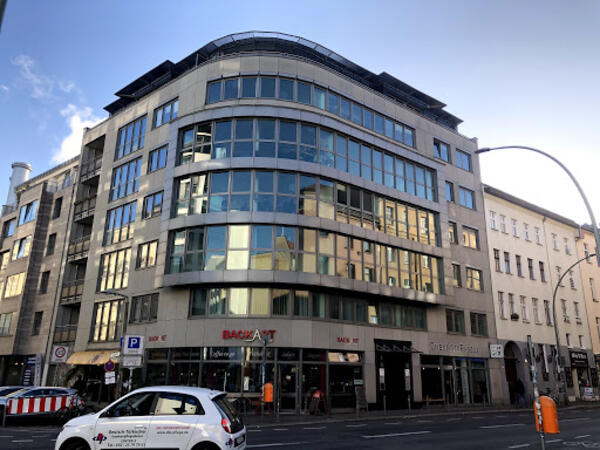
Our training facilities are located at Brückenstr. 4 in Berlin. Located on the fourth floor of a well-kept office building, our premises offer enough space for successful training courses in the heart of Berlin, within walking distance of the Jannowitzbrücke station.
Directions
The NobleProg training facilities are located in the heart of Berlin's Mitte district, just one underground station from Alexanderplatz, one of the centres of this vibrant city. By public transport you can reach us either by underground line U8 to Jannowitzbrücke station, followed by about 100 meters on foot.
Parking
Cars can be parked in the area along Brückenstr. and the nearby side streets, even if you may have to search for a moment. There is no charge for parking.
Local Amenities
Around the Rosenthaler Platz there are numerous small restaurants and shops where you can eat well and cheaply. There are also some hotels close by if you need accommodation for the training.
Our training facilities are located at Dianastrasse 46 in Potsdam-Babelsberg.
Our spacious training rooms are located directly opposite the Filmstudios Babelsberg and offer optimal training conditions for your needs.
Arrival
The NobleProg training facilities are conveniently located near the Medienstadt Babelsberg railway station,
and the A115 motorway is also easily accessible.
Parking
Parking is available in the surrounding streets around our training rooms.
Local Services
Potsdam offers numerous hotels and restaurants and is easily accessible thanks to its well-developed public transport system.
This instructor-led course in Berlin provides a beginner-friendly introduction to Microsoft Teams and Forms. Learners will master channel management, digital form creation, and the integration of these tools to enable efficient data collection and smoother team communication within an interactive learning environment.
Boost your organizational productivity with this Microsoft Teams training in Berlin. Master the art of navigating team structures, automating routine tasks with Power Automate, and enhancing collaboration through integrated Microsoft 365 tools. This course is ideal for professionals seeking practical skills to optimize their real-world workflows.
Get ready for the MS-721 exam through this practical training in Berlin, which focuses on managing Microsoft Teams collaboration, voice, and security systems. Master the configuration of policies, governance, and troubleshooting techniques for enterprise environments to elevate your administrative capabilities.
This live, instructor-led training, delivered in Berlin (either online or on-site), is designed for intermediate professionals aiming to maximize their utilization of Microsoft Teams and Read AI to improve meeting effectiveness and workflow efficiency.
By the end of the program, participants will be capable of:
Setting up and optimizing Microsoft Teams for streamlined meetings.
Integrating and personalizing Read AI functionalities within Teams.
Utilizing AI-powered tools including summaries, transcripts, and participation metrics.
Strengthening collaboration, task oversight, and post-meeting action tracking.
Applying advanced strategies and practical scenarios to sustain productivity levels.
This live, instructor-led training in Berlin (delivered online or on-site) is tailored for entry-level business professionals aiming to utilize Microsoft Teams and its strong integrations with Outlook, OneDrive, and Lists to drive effective team collaboration and productivity.
Navigate the Teams interface, establish teams and channels, and oversee communication through posts, chats, and meetings.
Coordinate and attend Teams meetings through both Teams and Outlook, employing collaboration tools like screen sharing, and handling meeting notes and recordings.
Optimize the management of emails, calendars, and Teams meetings with Outlook, while smoothly transitioning between email and Teams communication workflows.
Utilize OneDrive for cloud-based storage, sharing, and real-time document collaboration within Teams and Outlook, encompassing file version management and recovery.
Develop, tailor, and administer Lists to organize tasks and projects, enhance team collaboration, and integrate with Outlook and OneDrive.
Foster a productive, integrated work environment by seamlessly connecting Teams with Outlook, OneDrive, and Lists, thereby reducing duplicate tasks and elevating workflow efficiency.
Read more...
Last Updated:
Testimonials (2)
i learned alot
Rose-Ann - Heart FM
Course - Microsoft Teams: Practical Collaboration, Productivity, and Automation
The engagement and the practical examples we did as a group to get more understanding of the topic
ISABELLA - Sedibeng TVET College
Course - Microsoft Teams, Outlook, OneDrive, and Lists Integration
Online MS Teams training in Berlin, Microsoft Teams training courses in Berlin, Weekend Microsoft Teams courses in Berlin, Evening MS Teams training in Berlin, MS Teams instructor-led in Berlin, MS Teams coaching in Berlin, MS Teams boot camp in Berlin, MS Teams instructor-led in Berlin, Microsoft Teams one on one training in Berlin, Microsoft Teams instructor in Berlin, MS Teams trainer in Berlin, Weekend MS Teams training in Berlin, Evening MS Teams courses in Berlin, Online MS Teams training in Berlin, MS Teams classes in Berlin, Microsoft Teams private courses in Berlin, Microsoft Teams on-site in Berlin