NobleProg delivers high-quality Microsoft 365 Copilot training courses in Berlin, the dynamic heart of Germany's tech and innovation sector. Participants benefit from expert-led instruction tailored to the professional needs of the capital's diverse industry landscape. Join our Berlin-based programs to enhance your skills with hands-on learning experiences in a world-class urban environment.
Microsoft 365 Copilot integrates AI-driven support seamlessly into essential Microsoft 365 applications, including Word, Excel, Outlook, and Teams.
Through our instructor-led programs, professionals and teams can gain proficiency in Copilot’s full range of capabilities, covering tasks from content creation and email summarization to data analysis and workflow automation.
Training is offered through interactive remote desktop sessions or live onsite engagements in Berlin, featuring practical exercises tailored to real-world business contexts.
Regardless of whether you are upskilling a small group or a full department, onsite training can be conducted at your offices in Berlin or at a NobleProg facility in Berlin.
Known also as Microsoft 365 AI, M365 Copilot, or Copilot for Office, this program equips users to enhance productivity using their standard daily tools.
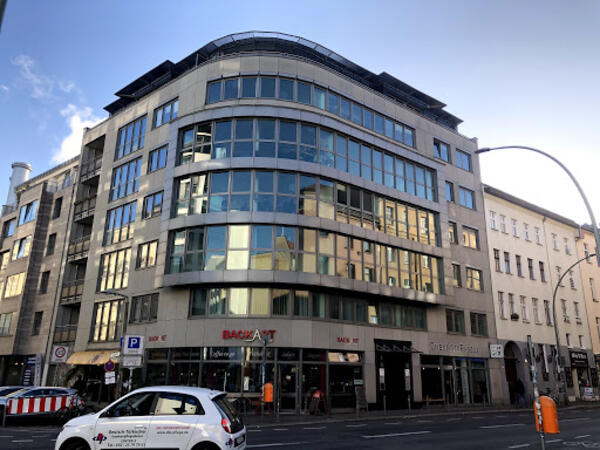
Our training facilities are located at Brückenstr. 4 in Berlin. Located on the fourth floor of a well-kept office building, our premises offer enough space for successful training courses in the heart of Berlin, within walking distance of the Jannowitzbrücke station.
Directions
The NobleProg training facilities are located in the heart of Berlin's Mitte district, just one underground station from Alexanderplatz, one of the centres of this vibrant city. By public transport you can reach us either by underground line U8 to Jannowitzbrücke station, followed by about 100 meters on foot.
Parking
Cars can be parked in the area along Brückenstr. and the nearby side streets, even if you may have to search for a moment. There is no charge for parking.
Local Amenities
Around the Rosenthaler Platz there are numerous small restaurants and shops where you can eat well and cheaply. There are also some hotels close by if you need accommodation for the training.
Our training facilities are located at Dianastrasse 46 in Potsdam-Babelsberg.
Our spacious training rooms are located directly opposite the Filmstudios Babelsberg and offer optimal training conditions for your needs.
Arrival
The NobleProg training facilities are conveniently located near the Medienstadt Babelsberg railway station,
and the A115 motorway is also easily accessible.
Parking
Parking is available in the surrounding streets around our training rooms.
Local Services
Potsdam offers numerous hotels and restaurants and is easily accessible thanks to its well-developed public transport system.
Discover how to leverage Copilot for Finance to optimize reporting and elevate productivity. This instructor-led training in Berlin empowers professionals with practical AI skills to automate accounting tasks, generate financial reports, and derive insights, ultimately enhancing the efficiency of your daily workflow.
This instructor-led training in Berlin delves into advanced Copilot Studio integration for technical experts. Attendees will master secure SQL execution, recruitment workflow automation, and Power Automate orchestration, ensuring the deployment of robust, production-ready AI assistants.
This live, instructor-led training in Berlin assists business professionals in mastering Microsoft 365 Copilot Chat to elevate daily productivity. Discover how to generate content, analyze data, and automate tasks across Word, Excel, PowerPoint, and Outlook by applying effective AI prompting and best practices.
This live session on Berlin enables public sector staff to leverage Microsoft 365 Copilot for drafting documents, analyzing data, and summarizing meetings with greater efficiency. Attendees will acquire practical prompting techniques and responsible AI practices tailored to government workflows, thereby enhancing daily productivity.
Elevate your team's efficiency with this instructor-led course on Berlin for Microsoft 365 Copilot. Master the art of drafting documents in Word, analyzing data in Excel, designing presentations in PowerPoint, managing email in Outlook, and optimizing collaboration in Teams. Perfect for professionals looking to streamline their workflows through artificial intelligence.
This instructor-led, live training in Berlin assists novices in mastering Microsoft 365 Copilot to enhance daily productivity. Learners will acquire practical competencies in document drafting, data analysis, email management, and team collaboration through intelligent AI insights.
This live, instructor-led training in Berlin (online or on-site) is tailored for intermediate-level supervisors and programming officers looking to advance their skills in SharePoint administration and the strategic use of Microsoft 365 Copilot.
By the end of this program, participants will be able to:
Understand the core principles of SharePoint architecture and administration.
Configure SharePoint sites and manage user access permissions.
Implement essential security and compliance frameworks within SharePoint.
Integrate and manage Microsoft 365 Copilot to improve team productivity.
Apply industry best practices for data governance and content management.
This hands-on workshop provides an immersive introduction to AI agents within Microsoft 365 Copilot, showing learners how to construct basic agents without the need for programming skills or external software.
Learners will examine pre-configured agents from Microsoft, such as Researcher and Analyst, gain insight into the operational mechanics of AI agents in commercial settings, and master the creation and application of custom agents via structured prompts and workflows within Copilot.
Emphasizing practical applications, the course enables participants to streamline repetitive duties, boost efficiency, and develop reusable AI assistants that can be seamlessly distributed among teams.
Upon completion of the session, learners will have successfully created their own AI agent and possess the skills to implement these strategies in their routine professional tasks.
This course is tailored for finance professionals who are already familiar with AI tools and aim to transition from sporadic usage to a confident, consistent daily practice with Microsoft Copilot. Participants will refine their prompting capabilities and leverage Copilot to tackle real-world financial tasks such as data reconciliation, forecasting, budgeting, and reporting. The session is highly interactive, centered on live exercises that utilize realistic finance datasets. All practical activities follow two parallel workflows: one for Copilot Chat (the Basic version included with Microsoft 365) and one for Microsoft 365 Copilot (the Premium paid license), ensuring that every participant can work with the license tier they currently hold.
Teams can leverage agents to handle knowledge inquiries and support document workflows in a structured manner. This two-day program focuses on Agent Builder during the first day and Copilot Studio—incorporating approval workflows and test scenarios—on the second. Attendees will conclude the course with a validated knowledge agent and a preliminary Studio agent setup.
This live, instructor-led training in Berlin is designed for key users, AI champions, and department leaders seeking to build custom Copilot agents for knowledge retrieval and document processing.
Upon completion, participants will be equipped to:
Determine the appropriate scenario for using Copilot Chat versus deploying a dedicated agent
Configure knowledge agents in Agent Builder, defining target audiences, knowledge sources, and operational boundaries
Grasp the architecture of Copilot Studio agents and construct an initial instance
Segment document processes into verifiable stages that require human oversight
Validate agent performance using defined test cases and acceptance standards
Distinguish between roles, permissions, licensing requirements, and operational responsibilities
Course Structure
Length: 2 days (7 hours per day)
Interactive sessions featuring a trainer, open discussions, and practical exercises based on participants' specific business contexts
Day 1 Deliverable: Each attendee will possess a tested knowledge agent and a tool mapping guide for their work scenarios.
Day 2 Deliverable: Each attendee will have a draft Studio agent with approval features, two verified process examples, and a strategic roadmap for their use cases.
Customization Availability
Interested parties may contact us to request a tailored version of this training.
Project collaboration within Microsoft 365 often involves navigating across Teams, Planner, Lists, and SharePoint, with a significant portion of effort dedicated to status reporting and follow-up activities. This one-day course demonstrates how Copilot and agents can streamline status reporting, facilitate meetings, manage tasks, and enhance risk detection. During the session, participants will develop a project knowledge agent and create a mock-up solution for a specific project challenge.
This live, instructor-led training in Berlin is designed for: Project managers, PMO staff, team assistants, and project members who utilize Microsoft 365, specifically Teams, Planner, Lists, and SharePoint.
Upon completion of this training, participants will be able to:
Categorize and understand the role of agents in Microsoft 365 for project workflows
Generate status reports from emails, meeting notes, and lists using Copilot
Leverage agents in Teams and Planner to optimize meeting and task management
Construct a project knowledge agent utilizing documents, lessons learned, and contact information
Surface risks and delays earlier in the project lifecycle
Develop a mock-up solution for a real-world project problem and present it
Course Format
Duration: 1 day (7 hours)
Interactive training featuring an instructor, discussions, and hands-on exercises focused on participants' specific use cases
Outcome, Day 1: Each participant will possess a status report, a validated project knowledge agent, and a presented mock-up for a real project problem.
Customization Options
To request a tailored version of this training, please contact us to make arrangements.
This live, instructor-led training in Berlin is tailored for business professionals and key users looking to develop simple Copilot agents without coding.
By the end of the session, attendees will be equipped to:
Integrated directly into Outlook, Teams, Word, Excel, and PowerPoint, Microsoft 365 Copilot leverages data that users already have access to. This course demonstrates how to craft effective prompts, validate outputs, and utilize features such as Notebooks, Pages, and agents. By the end of the session, participants will have developed a functional FAQ agent based on a SharePoint knowledge base.
This live, instructor-led training in Berlin is designed for: Employees and departments utilizing Microsoft 365 Copilot, ranging from beginners to advanced users.
Upon completion of this training, participants will be able to:
Differentiate between Copilot Chat and the embedded Copilot features within Outlook, Teams, Word, Excel, and PowerPoint
Understand the scope of data accessed by Copilot and how permission models apply
Draft emails, prepare meetings, compile reports, and create presentations using Copilot
Analyze data in Excel and verify the accuracy of the results
Formulate effective prompts and apply iterative refinement when initial responses are inadequate
Utilize Notebooks, Pages, and the Researcher and Analyst agents
Develop a basic FAQ agent using a SharePoint knowledge base
Course Format
Duration: Two days (7 hours each), also offered as a learning journey in 2-hour sessions
Interactive sessions led by a trainer, featuring discussions and hands-on exercises tailored to participants' specific use cases
Day 1 Outcome: Each participant will have implemented at least one use case within the applications and saved two custom prompts for their daily workflow
Day 2 Outcome: Each participant will possess a notebook, a verified Researcher output, and a tested FAQ agent. Each group will have presented a solution concept with a mock-up
Customization Options
For customized training arrangements, please contact us to discuss specific requirements
Read more...
Last Updated:
Testimonials (4)
Everything is possible :-)
Sandra Bardewyck - Media Carrier Solutions GmbH
Course - Microsoft 365 Copilot: AI Productivity Across Word, Excel, PowerPoint, Outlook, and Teams
i already have some reports that i know, i will use some of the prompts that looked at today
Kelly Cotham
Course - Copilot for Finance and Accounting Professionals
Learning and creating of agents.
Jana Nalevankova - Ness Romania
Course - Boost Your Productivity with Microsoft Copilot 365
Excellect knowledge level of the trainer
Pawel Dykowski - LKQ Polska Sp. z o. o.
Course - Microsoft 365 Copilot Chat for Word, Excel, PowerPoint, and Outlook
Online M365 Copilot training in Berlin, Microsoft 365 AI training courses in Berlin, Weekend Microsoft 365 AI courses in Berlin, Evening M365 Copilot training in Berlin, Microsoft 365 Copilot instructor-led in Berlin, Copilot for Office instructor in Berlin, Microsoft 365 AI on-site in Berlin, M365 Copilot classes in Berlin, Weekend Microsoft 365 Copilot training in Berlin, M365 Copilot coaching in Berlin, Microsoft 365 AI private courses in Berlin, Online M365 Copilot training in Berlin, Microsoft 365 Copilot boot camp in Berlin, M365 Copilot trainer in Berlin, Microsoft 365 Copilot instructor-led in Berlin, Copilot for Office one on one training in Berlin, Evening M365 Copilot courses in Berlin