NobleProg delivers high-quality Computer Graphics training courses in Berlin, the dynamic heart of Germany's tech and innovation sector. Participants benefit from expert-led instruction tailored to the professional needs of the capital's diverse industry landscape. Join our Berlin-based programs to enhance your skills with hands-on learning experiences in a world-class urban environment.
Delivered either online or onsite, these instructor-led live Computer Graphics courses utilize interactive discussions and hands-on exercises to master the core principles of the field.
You can access Computer Graphics training through "online live training" or "onsite live training" options. Online live training, also referred to as "remote live training," is facilitated via an interactive remote desktop. Alternatively, onsite live training takes place locally at your customer premises in Berlin or at NobleProg corporate training centers in Berlin.
NobleProg – Your Dedicated Regional Training Provider
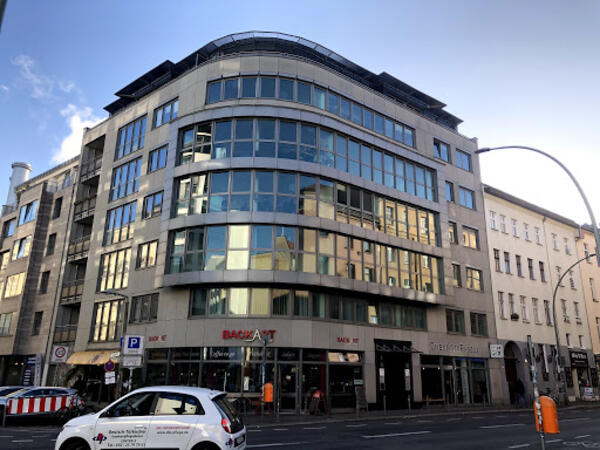
Our training facilities are located at Brückenstr. 4 in Berlin. Located on the fourth floor of a well-kept office building, our premises offer enough space for successful training courses in the heart of Berlin, within walking distance of the Jannowitzbrücke station.
Directions
The NobleProg training facilities are located in the heart of Berlin's Mitte district, just one underground station from Alexanderplatz, one of the centres of this vibrant city. By public transport you can reach us either by underground line U8 to Jannowitzbrücke station, followed by about 100 meters on foot.
Parking
Cars can be parked in the area along Brückenstr. and the nearby side streets, even if you may have to search for a moment. There is no charge for parking.
Local Amenities
Around the Rosenthaler Platz there are numerous small restaurants and shops where you can eat well and cheaply. There are also some hotels close by if you need accommodation for the training.
Our training facilities are located at Dianastrasse 46 in Potsdam-Babelsberg.
Our spacious training rooms are located directly opposite the Filmstudios Babelsberg and offer optimal training conditions for your needs.
Arrival
The NobleProg training facilities are conveniently located near the Medienstadt Babelsberg railway station,
and the A115 motorway is also easily accessible.
Parking
Parking is available in the surrounding streets around our training rooms.
Local Services
Potsdam offers numerous hotels and restaurants and is easily accessible thanks to its well-developed public transport system.
This instructor-led training in Berlin empowers intermediate AI engineers to construct and refine neural network models using the Huawei Ascend platform and CANN toolkit. Learners will configure their environments, develop applications with MindSpore, and deploy solutions to edge or cloud environments.
This instructor-led live session in Berlin delves into Huawei's AI stack, covering the spectrum from the CANN SDK to the MindSpore framework. It assists beginners and intermediate professionals in understanding how these elements converge on Ascend hardware to manage the AI lifecycle and deployment.
This instructor-led, live training in Berlin (online or onsite) is tailored for beginner to intermediate-level developers who aim to use OpenACC to program heterogeneous devices and capitalize on their parallelism.
By the conclusion of this training, participants will be able to:
Set up an OpenACC development environment.
Write and run a basic OpenACC program.
Annotate code with OpenACC directives and clauses.
This instructor-led training in Berlin focuses on the deployment and optimization of CV and NLP models via the CANN SDK for Ascend hardware. Attendees will gain skills in model conversion, pipeline integration, and performance enhancement for real-time detection and analysis tasks.
This instructor-led, live training in Berlin (online or onsite) is aimed at beginner-level to intermediate-level developers who wish to learn the basics of GPU programming and the main frameworks and tools for developing GPU applications.
By the end of this training, participants will be able to: Understand the difference between CPU and GPU computing and the benefits and challenges of GPU programming.
Choose the right framework and tool for their GPU application.
Create a basic GPU program that performs vector addition using one or more of the frameworks and tools.
Use the respective APIs, languages, and libraries to query device information, allocate and deallocate device memory, copy data between host and device, launch kernels, and synchronize threads.
Use the respective memory spaces, such as global, local, constant, and private, to optimize data transfers and memory accesses.
Use the respective execution models, such as work-items, work-groups, threads, blocks, and grids, to control the parallelism.
Debug and test GPU programs using tools such as CodeXL, CUDA-GDB, CUDA-MEMCHECK, and NVIDIA Nsight.
Optimize GPU programs using techniques such as coalescing, caching, prefetching, and profiling.
This instructor-led live training in Berlin empowers advanced developers to design, deploy, and optimize custom AI operators. Through mastery of CANN TIK and Apache TVM integration, participants will achieve sophisticated optimization and scheduling on Huawei Ascend hardware, ensuring robust real-world performance.
This instructor-led live training, delivered either online or on-site, is designed for developers at the beginner to intermediate level. It focuses on utilizing various frameworks for GPU programming, providing a comprehensive comparison of their features, performance characteristics, and compatibility.
By the conclusion of this program, participants will possess the ability to:
Establish a robust development environment equipped with the OpenCL SDK, CUDA Toolkit, ROCm Platform, a supporting device (compatible with OpenCL, CUDA, or ROCm), and Visual Studio Code.
Construct basic GPU applications for vector addition using OpenCL, CUDA, and ROCm, while analyzing the differences in syntax, structure, and execution flow among the frameworks.
Apply the respective APIs to query device details, manage memory allocation, handle host-to-device data transfers, launch kernels, and synchronize threads.
Write device-executed kernels and manipulate data using the specific language syntax of each framework.
Utilize framework-specific built-in functions, variables, and libraries to execute standard tasks efficiently.
Leverage distinct memory spaces, such as global, local, constant, and private, to optimize data movement and access patterns.
Manage parallelism by controlling the execution model elements, such as threads, blocks, grids, or work-groups, specific to each framework.
Perform debugging and testing of GPU applications using tools like CodeXL, CUDA-GDB, CUDA-MEMCHECK, and NVIDIA Nsight.
Implement performance optimizations through techniques such as coalescing, caching, prefetching, and profiling.
This instructor-led course on Berlin covers CloudMatrix for scalable AI inference. It guides you through deploying, optimizing, and monitoring models with CANN and MindSpore. Interactive exercises focus on packaging, conversion, serving, and performance tuning for real-time and batch workloads.
This instructor-led live training in Berlin (online or onsite) is designed for artists, game developers, or complete beginners who aim to utilize Blender to construct 3D models for interactive applications, video games, animated films, and related media.
By the end of this training, participants will be capable of:
Mastering the creation of animations and visual effects with Blender.
Utilizing curves, surfaces, metaballs, and hair particles to achieve realistic 3D motion simulations.
Exploring the fundamentals of non-destructive modeling and animation.
Exporting 3D models and assets for integration into game engines, 3D printers, or other software platforms.
This live, instructor-led training on Berlin delves into the key principles and practical basics of running AI models on Ascend edge devices via the CANN toolkit, enabling participants to develop practical skills in compiling, optimizing, and managing resources in constrained environments.
Designed for developers with beginner to intermediate experience, this live instructor-led session is delivered either virtually or on-site. The curriculum focuses on deploying and utilizing ROCm on the Windows platform, empowering participants to effectively program AMD GPUs and harness their parallel processing capabilities.
Upon completion of this training, attendees will possess the skills to:
Configure a development workspace integrating the ROCm Platform, an AMD GPU, and Visual Studio Code within a Windows environment.
Develop a foundational ROCm application that executes vector addition on the GPU and retrieves results from device memory.
Leverage the ROCm API to interrogate device specifications, manage device memory allocation and deallocation, transfer data between host and device, initiate kernel execution, and synchronize threads.
Compose kernels in HIP that run on the GPU to process and manipulate data.
Utilize HIP’s built-in functions, variables, and libraries to streamline common tasks and operations.
Apply ROCm and HIP memory hierarchies—including global, shared, constant, and local spaces—to enhance data transfer efficiency and memory access patterns.
Manage parallelism by controlling threads, blocks, and grids through ROCm and HIP execution models.
Diagnose and validate ROCm and HIP applications using specialized tools like the ROCm Debugger and ROCm Profiler.
Enhance the performance of ROCm and HIP code through strategies such as coalescing, caching, prefetching, and profiling.
This instructor-led, live training in Berlin (online or onsite) is designed for developers ranging from beginner to intermediate levels who wish to program AMD GPUs using ROCm and HIP to exploit their parallelism.
Upon completion of this training, participants will be equipped to:
Establish a development environment incorporating the ROCm Platform, an AMD GPU, and Visual Studio Code.
Develop a fundamental ROCm application that executes vector addition on the GPU and retrieves results from GPU memory.
Leverage the ROCm API to query device specifications, manage memory allocation and deallocation, transfer data between host and device, launch kernels, and synchronize threads.
Compose kernels in HIP that run on the GPU and manipulate data efficiently.
Utilize HIP’s built-in functions, variables, and libraries to execute standard tasks and operations.
Apply ROCm and HIP memory spaces, including global, shared, constant, and local memory, to enhance data transfer and memory access performance.
Utilize ROCm and HIP execution models to manage threads, blocks, and grids, thereby defining the level of parallelism.
Debug and test ROCm and HIP applications using tools such as the ROCm Debugger and ROCm Profiler.
Optimize ROCm and HIP code by employing techniques like coalescing, caching, prefetching, and profiling.
This instructor-led live session, available either online or on-site, is designed for artists, game developers, or those new to the field who want to leverage Blender to build 3D models for interactive applications, video games, animated films, and more.
Upon completion, attendees will be equipped to:
Grasp the fundamental principles and core concepts underlying 3D modeling.
Navigate the diverse range of modes and tools used for modeling and modifying 3D meshes.
Utilize specialized tools for UV mapping/unwrapping, sculpting, and painting 3D models for rendering.
This live training in Berlin provides an introductory guide to the CANN toolkit for AI framework developers. It covers the process of setting up environments, converting models, and deploying applications on Ascend hardware using MindSpore, TensorFlow, or PyTorch, ensuring a comprehensive understanding of the workflow from training to inference.
Optimize AI workloads on Ascend, Biren, and Cambricon with this hands-on training in Berlin. Learn to benchmark models, identify bottlenecks, and apply graph, kernel, and operator-level optimizations. Tune deployment pipelines to enhance throughput and latency across these leading platforms.
This live, instructor-led training, delivered either online or onsite, targets graphic designers and animators from beginner to intermediate levels who aim to learn how to produce high-quality animations, interactive media, and compelling web content using Adobe Animate.
By the end of the session, participants will be capable of:
Confidently navigating the Adobe Animate workspace and tools.
Constructing and editing animations through keyframes, motion tweens, and shape tweens.
Designing interactive animations and applications with the aid of ActionScript and JavaScript.
Incorporating audio and video assets into their projects.
Exporting animations for distribution on web, video, and mobile channels.
Elevate neural network inference performance on Ascend AI processors through this advanced, instructor-led course in Berlin. Delve into CANN's runtime architecture and utilize the Graph Engine, TIK, and TVM to master profiling, custom operator creation, and the resolution of memory bottlenecks.
Transition CUDA applications to Chinese GPU architectures such as Huawei Ascend and Biren in Berlin. This instructor-led course assists advanced developers in code translation and performance optimization, featuring hands-on labs for porting CUDA codebases to emerging SDKs.
This instructor-led live training in Berlin (online or onsite) is designed for developers from beginner to intermediate levels who wish to program NVIDIA GPUs using CUDA to utilize their parallel processing capabilities.
By the end of this training, participants will be able to:
Set up a development environment featuring the CUDA Toolkit, an NVIDIA GPU, and Visual Studio Code.
Build a basic CUDA program that performs vector addition on the GPU and retrieves results from GPU memory.
Utilize the CUDA API to query device details, manage device memory, transfer data between host and device, launch kernels, and synchronize threads.
Use CUDA C/C++ to write kernels that execute on the GPU and manipulate data.
Apply CUDA built-in functions, variables, and libraries to handle common tasks and operations.
Leverage CUDA memory spaces, such as global, shared, constant, and local, to optimize data transfers and memory access.
Employ the CUDA execution model to control threads, blocks, and grids that define parallelism.
Debug and test CUDA programs using tools like CUDA-GDB, CUDA-MEMCHECK, and NVIDIA Nsight.
Enhance CUDA program performance through techniques such as coalescing, caching, prefetching, and profiling.
This instructor-led, live training in Berlin covers the fundamentals of Psdto3D101 for lenticular design. Participants will learn to create 3D, flip, morph, and motion effects, optimizing files for professional printing through interactive lectures and hands-on practical exercises.
This live training in Berlin assists intermediate AI developers in deploying models on Ascend processors via the CANN toolkit. You will learn to convert frameworks like PyTorch and TensorFlow, enhance performance, and troubleshoot issues for efficient edge and cloud inference setups.
This live training in Berlin empowers developers to effectively program and optimize applications on Biren AI accelerators. The curriculum covers GPU architecture, SDK setup, and the migration of CUDA code to Biren, with a strong emphasis on performance tuning and debugging methodologies.
This live, instructor-led session in Berlin (available online or onsite) targets artists, game developers, and newcomers aiming to utilize Blender for creating 3D models for interactive applications, video games, and animated content.
By the conclusion of this training, participants will be able to:
Comprehend the essential principles and core concepts of 3D modeling.
Utilize various modes and tools for mesh modeling and editing.
Create animations and visual effects through Blender.
Simulate realistic 3D motions by adding curves, surfaces, metaballs, and hair particles.
Employ tools for UV mapping/unwrapping, sculpting, and painting 3D models.
Export 3D models and assets to game engines, 3D printers, or other software platforms.
This instructor-led live training in Berlin empowers developers to build and deploy AI models using BANGPy and Neuware on Cambricon MLUs. Learners will configure their environments, develop optimized models, and integrate MLU acceleration into edge and data center applications.
This live, instructor-led training in Berlin, delivered either online or on-site, is specifically tailored for beginner-level system administrators and IT professionals seeking to master the installation, configuration, management, and troubleshooting of CUDA environments.
By the end of the session, participants will have the capability to:
Understand the underlying architecture, components, and full range of CUDA capabilities.
Install and properly configure CUDA environments.
Manage and optimize CUDA resources for efficiency.
This instructor-led live training in Berlin, offered online or onsite, targets developers from beginner to intermediate levels who intend to use OpenCL for heterogeneous device programming and parallelism exploitation.
By the end of this training, participants will be capable of:
Setting up a development environment that includes the OpenCL SDK, an OpenCL-supported device, and Visual Studio Code.
Creating a basic OpenCL program that performs vector addition on the device and retrieves results from device memory.
Using the OpenCL API to query device information and create contexts, command queues, buffers, kernels, and events.
Using the OpenCL C language to write kernels that execute on the device and manipulate data.
Utilizing OpenCL built-in functions, extensions, and libraries to perform common tasks and operations.
Applying OpenCL host and device memory models to optimize data transfers and memory accesses.
Controlling work-items, work-groups, and ND-ranges using the OpenCL execution model.
Debugging and testing OpenCL programs using tools such as CodeXL, Intel VTune, and NVIDIA Nsight.
Optimizing OpenCL programs using techniques such as vectorization, loop unrolling, local memory, and profiling.
This live, instructor-led training in Berlin (delivered online or onsite) is designed for beginner to advanced 3D design and printing enthusiasts who intend to use Fusion 360 to design, simulate, and prepare models for 3D printing.
Upon completion of this training, participants will be able to:
Install and configure Fusion 360 to ensure optimal performance.
Design, model, and simulate 3D objects within a cohesive environment.
Refine and prepare designs specifically for the 3D printing workflow.
Collaborate and distribute designs by leveraging Fusion 360's cloud features.
This instructor-led, live training in Berlin (available online or onsite) targets C++ developers seeking to leverage CUDA for application acceleration, high-performance GPU kernel creation, and the use of parallel algorithm libraries in scientific computing, data processing, and machine learning environments.
This live, instructor-led training in Berlin (offered online or onsite) is designed for C/C++ developers aiming to boost the performance of compute-intensive applications using CUDA. The scope includes data processing, scientific simulations, machine learning tasks, and image processing pipelines.
This live, instructor-led training in Berlin—delivered online or on-site—is designed for software developers, data analysts, and technical professionals who intend to utilize TensorFlow 2.x and Keras to build, train, and deploy deep learning models for computer vision, natural language processing, and multimodal applications.
Participate in this practical training on Berlin to become proficient with FreeCAD, an open-source parametric 3D modeler. You will learn to design real-world objects for manufacturing or 3D printing, export to formats such as STEP and STL, and streamline workflows using Python. This course is ideal for designers and engineers.
This live, instructor-led training session, conducted in Berlin, provides a comprehensive guide to programming GPUs for parallel computing. It covers the utilization of various platforms, with a specific focus on the CUDA platform, its core features, and the implementation of advanced optimization techniques. The course highlights practical applications across deep learning, analytics, image processing, and engineering solutions.
Read more...
Last Updated:
Testimonials (2)
the point that Huba took the time to sit with me as the lesser knowledgeable of the application and go through each part and explain where i had gone wrong and how to correct the issue
Paul - Nottinghamshire Police
Course - Blender: 3D Modeling Fundamentals
Trainers energy and humor.
Tadeusz Kaluba - Nokia Solutions and Networks Sp. z o.o.
Online Computer Graphics training in Berlin, Computer Graphics training courses in Berlin, Weekend Computer Graphics courses in Berlin, Evening Computer Graphics training in Berlin, Computer Graphics instructor-led in Berlin, Computer Graphics boot camp in Berlin, Weekend Computer Graphics training in Berlin, Online Computer Graphics training in Berlin, Computer Graphics trainer in Berlin, Computer Graphics private courses in Berlin, Computer Graphics coaching in Berlin, Computer Graphics instructor in Berlin, Evening Computer Graphics courses in Berlin, Computer Graphics on-site in Berlin, Computer Graphics one on one training in Berlin, Computer Graphics classes in Berlin, Computer Graphics instructor-led in Berlin